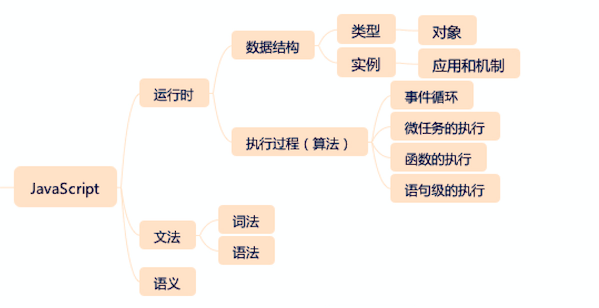
原型
-
对象 (object) 和实例 (instance)
- 对象是一个具有多种属性的内容结构
- 实例是类的具象化产品,可以使用
new运算符在原型 (prototype) 基础上新建一个实例
function doSomething() {} var doSomething = function () {}; var doSomeInstancing = new doSomething(); // new 操作等价于 // var doSomeInstancing = {}; doSomeInstancing.__proto__ = doSomething.prototype- 每一个对象拥有原型对象,对象以其原型为模板、从原型继承方法和属性。原型对象也可能拥有原型,并从中继承方法和属性,一层一层、以此类推。这种关系常被称为原型链 (prototype chain)
-
原型 (prototype)
每个函数都有一个特殊的属性叫作原型 (prototype)
function doSomething() {} console.log(doSomething.prototype); -
__proto__是每个实例 (instance) 上都有的属性
实例的
__proto__就是函数的prototype属性function doSomething() {} doSomething.prototype.foo = "bar"; // add a property onto the prototype var doSomeInstancing = new doSomething(); doSomeInstancing.__proto__ === doSomething.prototype; // true // 实例 doSomeInstancing 的 __proto__ 属性就是函数 doSomething 的 prototype 属性
参考:
async await
fetch("https://blog.impyq.com")
  .then((response) => response.text())
  .then(console.log)
  .catch(console.error);
等价于
const test = async () => {
  try {
    const response = await fetch("https://blog.impyq.com");
    const data = await response.text();
    console.log(data);
  } catch (error) {
    console.error(error);
  }
};
test();
Promise
Promise 是一个对象, 它代表了一个异步操作的最终完成或者失败.
本质上 Promise 是一个函数返回的对象, 可以在它上面绑定回调函数, 这样就不需要把回调函数作为参数传入这个函数了.
const promise = doSomethingAsync();
promise.then(成功的回调, 失败的回调);
// 简写为
doSomething().then(成功的回调, 失败的回调);
then() 函数会返回一个和原来不同的新的 Promise, 这用就实现了链式调用 (chaining).
每一个 Promise 都代表了链中另一个异步过程的完成.
doSomething()
  .then((result) => doSomethingElse(result))
  .then((newResult) => doThirdThing(newResult))
  .then((finalResult) => {
    console.log(`Got the final result: ${finalResult}`);
  })
  .catch(failureCallback);
例子 1:
// 一秒后打印 123
setTimeout(function () {
  console.log(123);
}, 1000);
// 改成 Promise 形式
new Promise((resolve, reject) => {
  setTimeout(function () {
    resolve(123); // 使用 resolve 接收正确结果
  }, 1000);
}).then((res) => console.log(res));
// reject 接收错误, 倒入到 catch 中
new Promise((resolve, reject) => {
  setTimeout(function () {
    reject(123); // reject 接收错误
  }, 1000);
})
  .then((res) => console.log("success: " + res))
  .catch((e) => console.log("error: " + e));
async 函数
async 和 await 关键字让我们可以用一种更简洁的方式写出基于 Promise 的异步行为, 而无需刻意地链式调用 promise.
async await 是 promise then 的语法糖.
例子 1:
var p1 = () =>
  new Promise((res, rej) => {
    console.log("这里是 Promise 构造函数, 在调用 p1 函数时会立刻执行");
    // 阻塞 1 秒
    setTimeout(() => res(123), 1000);
  });
// 加上 async 关键字后, q1 还是普通函数,
// 但在函数中可以使用 await 关键字
// await 关键字后面跟一个返回 Promise 对象的函数
// await 会拿到 resolve 结果, 是 then 函数的语法糖
async function q1() {
  var res = await p1();
  console.log(res);
}
// 执行 q1, 可以在 1 秒后看到 123
q1();
// q1 还原成 then 形式
function q1() {
  p1().then((res) => console.log(res));
}
await 只能拿到 resolve 的值, 处理 reject 的错误需要 try catch.
例子 2:
var successFunc = () =>
  new Promise((res, rej) => {
    setTimeout(() => res(123), 1000);
  });
var errFunc = () =>
  new Promise((res, rej) => {
    setTimeout(() => {
      res(456);
    }, 1000); // 1 秒
    setTimeout(() => {
      rej("error crash");
    }, 500); // 500 毫秒
  });
async function foo() {
  try {
    var data1 = await successFunc();
    console.log("data1: " + data1); // data1 为传入 res 的值
    var data2 = await errFunc();
    // 这行不会执行因为 500 毫秒时先执行了
    // rej("error crash"), 这个 Promise 结束了
    // 不会执行 1 秒后的 res(456)
    console.log("data2: " + data1);
  } catch (err) {
    console.log("catch: " + err);
  }
}
foo();
// 输出
// data1: 123
// catch: error crash
参考:
- 【小知识】第 8 期 js 中 Promise 与 async/await 的用法简介
- MDN - 使用 Promise
- MDN - Promise
- MDN - async 函数
- 几分钟搞明白 Promise, async await 的用法
- 5 分钟彻底掌握 async await 原理,面试手写再不用怕
对象和数组
-
析构对象
const person = {
  name: "张三",
  age: 30,
  pet: {
    type: "猫",
  },
};

let {
  name,
  pet: { type },
} = person;

console.log(`名字: ${name}, 宠物类型: ${type}`);
// 名字: 张三, 宠物: 猫
析构传给函数的参数:
const print = ({ name, pet: { type } }) => { console.log(`名字: ${name}, 宠物类型: ${type}`); }; print(person); // 名字: 张三, 宠物: 猫 -
析构数组
const [first] = ["张三", "李四", "王五"]; console.log(first); // 张三 // 使用 , 跳过不需要的值 (列表匹配 list matching) const [, , third] = ["张三", "李四", "王五"]; console.log("third:", third); // third: 王五 -
对象字面量增强
与析构相反, 对象字面量增强把对象重新组合成一体
const name = "张三"; const age = 30; const print = function () { console.log(`姓名: ${this.name}, 年龄: ${this.age}`); }; const person = { name, age, print }; console.log(person); person.print(); // { name: '张三', age: 30, print: [Function: print] } // 姓名: 张三, 年龄: 30 -
展开运算符
展开运算符是三个点 (…)
- 合并数组
const animal = ["goose", "duck"]; const flower = ["rose", "iris"]; const list = [...animal, ...flower]; console.log("list:", list); // list: [ 'goose', 'duck', 'rose', 'iris' ]- 无需改变原数组, 创建一个副本
const animal = ["goose", "duck"]; const [a] = [...animal].reverse(); console.log("a:", a); console.log("animal:", animal); // a: duck // animal: [ 'goose', 'duck' ]- 获取数组剩余元素
const animal = ["cat", "dog", "goose", "duck"]; const [first, ...others] = animal; console.log("first:", first); console.log("others:", others);- 三个点号句法把函数参数收集到一个数组中
function print(...args) { console.log("args:", args); } print("cat", "dog"); // args: [ 'cat', 'dog' ]- 处理对象
与合并数组类似, 这次是合并对象
const morning = {
  breakfast: "皮蛋瘦肉粥",
  lunch: "牛肉粉",
};
const dinner = "老友粉";
const oneday = {
  ...morning,
  dinner,
};
console.log("oneday:", oneday);
// oneday: { breakfast: '皮蛋瘦肉粥', lunch: '牛肉粉', dinner: '老友粉' }
参考:
Promise 与异步编程
参考: «Understanding ECMAScript 6» (深入理解 ES6, 作者 Nicholas C. Zakas)
job queue, event loop
js 引擎在同一时刻只能执行一段代码, 代码会被放置在 job queue (作业队列, 工作队列) 中.
每当一段代码准备执行, 它就会被添加到 job queue.
event loop (事件循环) 是 js 引擎的一个内部处理线程, 它能监视代码的执行并管理 job queue.
当 js 引擎结束当前代码的执行后, 事件循环就会执行队列中的下一个 job.
事件模型
let button = document.getElementById("my-btn");
button.onclick = function (event) {
  console.log("clicked!");
};
在这段代码中, console.log("clicked!") 直到 button 被点击后才会执行.
当 button 被点击, 赋值给 onclick 的函数就被添加到 job queue 作业队列尾部,
并在队列前部所有任务结束之后再执行.
回调模式
nodejs 错误优先 (error-first) 的回调函数风格.
const { readFile, writeFile } = require("fs");

readFile("test.txt", (err, contents) => {
  if (err) {
    throw err;
  }
  console.log(contents);
  const opt = {
    flag: "a", // a: 追加写入; w: 覆盖写入
  };
  writeFile("test.txt", contents, opt, (err) => {
    if (err) {
      throw err;
    }
    console.log("file was written!");
  });
});

console.log("hi");
使用回调函数模式, readFile() 会立即执行, 在读取磁盘时暂停.
console.log("hi") 会在 readFile() 被调用后立即输出,
早于 console.log(contents);
readFile() 的成功调用引出了另一个异步调用 writeFile(),
当 readFile() 执行结束后, 添加一个 job 到 job queue 尾部,
导致 writeFile() 在之后被调用. writeFile() 也会在执行结束后向队列添加一个 job.
这种嵌套层太多就会陷入回调地狱 (callback hell).
Promise
Promise 是为异步操作的结果准备的占位符.
let promise = readFile("example.txt");
期初 Promise 为挂起状态 (pending state), 表示异步操作未结束. 一旦异步操作结束, 会进入两种可能状态之一:
- 已完成 (fulfilled): Promise 的异步操作已成功结束
- 已拒绝 (rejected): Promise 的异步操作未成功结束
可以使用 then() 方法在 Promise 的状态改变时执行一些操作.
const fs = require("fs");

function myReadFile(path) {
  return new Promise((resolve, reject) => {
    fs.readFile(path, (err, data) => {
      if (err) {
        reject(err); // <-- 拒绝后的数据
      }
      resolve(data); // <-- 完成后的数据
    });
  });
}

let promise = myReadFile("test.txt");

promise.then(
  (content) => {
    console.log("content", content);
  },
  (err) => {
    console.log("err", err.message);
  }
);
then() 方法接受两个参数, 一个是 Promise 被完成时要调用的函数,
另一个是 Promise 被拒绝时要调用的函数.
任何与异步操作关联的附加数据都会被传入 resolve(),
reject() 会被传入与拒绝相关的附加数据.
then() 也可以只传一部分参数
promise.then((content) => {
  // 完成
  console.log("content", content);
});

promise.then(null, (err) => {
  // 拒绝
  console.log("err", err.message);
});
Promise 还有 catch() 方法, 其行文等同于只传递拒绝处理函数给 then()
let promise2 = myReadFile("notexist.txt");

promise2.then(null, (err) => {
  console.log("err", err.message);
});
// 等同于
promise2.catch((err) => {
  console.log("err", err.message);
});
Utility Types
意思是充当工具的类型
用法: 用范型给它传入一个其它类型, 然后 utility type 对这个类型进行某种操作
type Person = {
  name: string;
  age: number;
};

// 使用 Partial 可以对 Person 这种类型不用传所有参数 (即不用传 age)
// 而不需要修改原来的类型定义
const xiaoming: Partial<Person> = { name: "xiaoming" };

// Omit 可以 "删除" 原类型 Person 的某些属性
const shenmiren: Omit<Person, "name"> = { age: 20 }; // 合法
const shenmiren: Omit<Person, "name"> = { name: "报错!" }; // 报错, 因为 Omit 了 name 属性
参考: